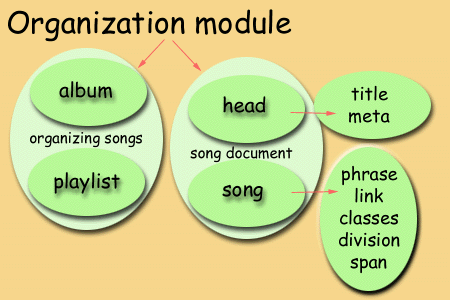
The Organization Module contains the following notions:
An album consists of a number of songs, listed sequentially. An agent should by default perform the songs in the order in which the songs appear in the list. This order can be overridden with a specific playlist.
In practice there are a number of words used for this concept, including the word "program". The word album is recommended as program is used in too many different contexts in the music environment. Meanings range from the order in which music pieces are performed at a concert, to computer programs and stored chunks of data on digital music devices (such as synthesizers). Using "program" as an element name may just contribute to further confusion.
An album can be declared as follows:
Here is an example of a list of songs on the 'album'.
<album>
  <song src="oneday.mml" id="1"></song>
  <song src="rabbit.mml" id="2"></song>
</album>
Here is an example of mixed devices used for the album.
<album>
  <song src="oneday.mml" id="1">
   <device type="CD" program="5"></device>
   <device type="PC" href="http://www.music.org"></device>
  </song>

  <song src="someday.mml" id="2">
   <device type="CD" program="12"></device>
  </song>
</album>
Here are various aspects that should be kept in mind for album.
When a user chooses a particular album, the rendering device executes the songs in the album according to the default order. A user may set up his/her own playlist, in which case the rendering device will follow that order. It should also be possible for a user to specify the device used for rendering. For example, the user may have access to different devices (tape recorder, CD-player, MIDI-synthesizer) and may possess versions of a song for each of these devices. In the playlist the user can then stipulate which device should be used.
MML may thus be useful in managing discotheque archives. If the catalogue uses MML to describe its content, automatic retrieval of a particular song may be relatively easy. And a roaming DJ should be able to call on a particular song in the archive from his internet-enabled cell phone or PDA.
The playlist is based on the list of songs in an album. The playlist can call on songs either by their full URN or URLs, or by their ids. The playlist can call upon songs from different albums.
A playlist can be declared as follows:
A playlist can be declared in the head of the *.mml file, or in a separate *.pla file that is called with the link element.
In this example the order in the album is reversed in the playlist.
<album>
 <song src="oneday.mml" id="1"> </song>
 <song src="rabbit.mml" id="2"> </song>
</album>

<playlist>
 <song id="2"> </song>
 <song id="1"> </song>
</playlist>
<playlist>My favorites

<album href="wanda.alb">
 <song src="oneday.mml">
</album>

<album href="bunnies.alb">
 <song src="rabbit.mml">
</album>

</playlist>
A possible application of this is the following. A user may set up her own playlist, send it along the internet and have the songs played at a remote site.
The head element functions like the head element of any SGML document. It contains all the metadata, links and the song title.
<mml>
 <head>
   <title>My song</title>
   <meta name="performer" content="Joe Blu" />
 </head>

 <song noteset="3" key="Cmaj" tempo="120">
 ...
 </song>

</mml>
The title element is contained in the head of a song file.
<mml>
 <head>
   <title>My song</title>
 </head>

 <song>
 ...
 </song>

</mml>
Metadata contains information about a song or album. The structure of the meta element is as follows:
| element declaration | keyword | value |
Reserved keywords are used as "fields" to identify the kind of metadata. Here is a tentative list of possible keywords:
See Global song naming scheme. in the General Module.
This example does not strictly follow the known structure of the HTML meta element. It remains to be investigated whether MML should stick to that format, or use this should shorter format:
<meta performer="Joe Blu"
 date="Fri, 01 May 1998 22:30:00 GMT"
 version="Unplugged"
 concert="Smokin' Blues"
 venue="Hillbilly Inn"
 place="New Haven"
  />
The song element is also part of the general module.
This definition is very loose and what is regarded as an autonomous song probably depends on the composer.
The SDML cantus (ie Latin for "song") is similar to the MML song. The words "song" and "composition" have similar meanings in this context.
However, a song in MML also refers to structural performance and sound manipulation elements, thus "composition" is too limited. From a melodic point of view, a song (usually) consists of several music phrases.
The song element takes the name attribute and various others.
<mml>
 <head>
   <title>My song</title>
 </head>

<song>
 <bar barid="2>"[A D] [3G D] ([3G E])2 </bar>
 <bar barid="3">[A D] [3E E] ([3E C])2 </bar>
 <bar barid="4">[3E:2 B:2] R [B E] </bar>

 ...
 </song>

</mml>
The typical structure of popular music usually consists of two or three phrases, ie typicallly an A and B part and the chorus.
| Verse 1 | Phrase A |
| Verse 2 | Phrase A |
| Chorus | Phrase B |
| Verse 3 | Phrase A |
| Chorus | Phrase B |
| Chorus repeated | Phrase B |
A phrase can also be a smaller unit. Features that are applied to a phrase, such as a change in tempo, are valid for that phrase only. Marking a song with phrases may be optional, depending on specific requirements. However, for comprehensive and complete markup it would be wise to mark as many objects as possible.
For a bookmark the id and barref attributes are used as in SGML or HyTime. A public or system identifier is indicated. Any object can be linked to an MML "document". External objects need to be declared first, then called from within the body of the song.
Creating a bookmark typically consists of three steps:
Here is an example of declaring the linked entity:
<!ENTITY soundone SYSTEM
"http://www.songs.org/wow.wav">
The linked location is anchored in the body of the song with the HyTime "name location" (nameloc) element. At the objects intended location in the body of the song, add:
<nameloc id="1" />
Links to the object can be made from many different other locations. The HyTime element clink (pronounced "c-link") element with the linkend attribute is used.
<clink linkend="1">Follow this link</clink>
The link element links the *.mml file to its associated files (see the list of possible files). The link element is empty and is declared as content of the head element.
...
 <head>
 <link rel="wow.tun" />
 <link rel="mine.ins" />
 </head>
 ...
The classes element allows the creation of author-defined shorthand declarations. Instead of declaring a list of elements at each instant, a series of elements can be declared as a class and instantiated by calling on the class name.
Consider the score of Musorgsky's Boris Godunov. There are 8 C staffs totalling 40 bars on the first page. Instead of repeating the detail for all the similar bars, a class can be declared that is called when required. The proposed syntax follows that used in CSS.
<head>
 <classes>
 .basic {
 key Fs Cs Gs Ds;
 time 4:4 }
 </classes>

</head>

<song>
 <staff.basic>
 <bar 1> R </bar>
 ....
 </staff>
</song>
The function of the div element is similar to the HTML element in that it marks a blocklevel structure. An identifier name can be declared in the div start tag, to be called upon in another (or more than one) element instance (thus IDREF).
The application of this is as follows. The features declared for the division apply to all the children -- except where declared otherwise.
Say there is a section of music that is repeated exactly the same at different locations in the song. At the first occurrence, mark the section with the div element and assign a unique identifier name to it by using the declare attribute. At each other instance where the section should reappear, call on that unique identifier with the repeat attribute and the unique identifier name.
See the Identifier method for repeating parts of music.
The function of the span element is similar to the HTML span as it also marks inline level structures. An identifier name can be declared in the span start tag, to be called upon in another (or more than one) element instance (thus IDREF).
This element was introduced in the first draft, but since then its general function has been replaced by the functions of specific elements. It needs to be seen if it will remain useful in MML.
The bank attribute is used with the Synthesizer Module. Sound banks have nothing to do with sound generation, but with their organization and administration, which is why the bank and program attributes are part of the Organization Module.
The program attribute is used with the Synthesizer Module. Sound programs select specific sounds and have nothing to do with sound generation, but with their organization and administration, which is why the bank and program attributes are part of the Organization Module.
© 1999, 2000 Author: Jacques Steyn